A Guide to Motion Graphics for Social Media
Create scroll-stopping motion graphics for social media. This guide covers the full workflow from strategic planning to animation and flawless export settings.
Motion graphics are more than just animated text and logos; they're your secret weapon for cutting through the noise on social media. Think of them as living, breathing visuals designed to grab attention in a feed that’s constantly moving. Unlike a flat image that just sits there, motion tells a story, breaks down a complex idea, or showcases a product in a way that’s impossible to ignore. It’s what makes someone stop scrolling.
Why Motion Graphics Are a Game-Changer on Social Media
Let's be real. In the endless river of content on Instagram, TikTok, and LinkedIn, a static image is fighting a losing battle. These platforms are built for motion. Our eyes are naturally drawn to it. A simple, well-designed post can easily get buried, but adding even the slightest bit of animation makes it pop.
This isn't just a hunch—the numbers tell the same story. Animated content consistently crushes static images in performance. We're talking up to 49% more engagement and conversion rates that can be a staggering 80% higher. That’s a massive difference, and it shows just how much user behavior has changed in these fast-paced feeds.
To put this into perspective, here's a quick look at how the two stack up.
Static vs Motion Graphics Performance Snapshot
| Metric | Static Content | Motion Graphics |
|---|---|---|
| Engagement Rate | Baseline | Up to 49% higher |
| Click-Through Rate | Lower | Significantly Higher |
| Brand Recall | Moderate | Very High |
| Shareability | Lower | Much Higher |
| Conversion Rate | Baseline | Up to 80% higher |
As you can see, the data clearly shows that incorporating movement gives you a major advantage across the board.
The Psychology Behind the "Scroll Stop"
So, what makes motion so powerful? It all comes down to basic human biology. Our peripheral vision is hardwired to pick up on movement—a survival instinct left over from our cave-dwelling days. When something animates in a mostly static environment (like a social media feed), it instantly triggers that instinct and grabs our focus.
That split-second advantage is everything. It’s your window to interrupt the scroll and deliver your message. I've seen brands master this to achieve incredible results. They use motion to:
- Boost Brand Recall: An interesting animation will stick in someone's head way longer than a static photo they glanced at for a second.
- Increase Shareability: People love sharing cool, dynamic content. It's just more fun and interesting, which means more organic reach for you.
- Drive Action: An animated call-to-action—like a button that wiggles or text that slides in—is far more persuasive than a flat, boring one.
The true value of motion graphics isn't just about looking cool or modern. It's about fundamentally changing how people interact with your brand online. It’s the difference between being scrolled past and actually being seen.
From Static to Strategic
The smartest brands get this. A fashion brand might use a subtle looping animation to make a handbag sparkle. A B2B software company could use a simple animated graph to make dry data easy to understand. In both cases, they’re using motion graphics for social media as a strategic tool, not just decoration.
The key is to shift your thinking. Motion isn't an afterthought; it's a core part of your communication strategy. You can find more great tips on this in the insights from Branditok's blog. This strategic mindset is the foundation for creating animations that don't just look pretty but actually deliver real, measurable results.
Your Strategic Blueprint Before You Animate
It’s tempting to jump right into After Effects and start making things move, but that’s a rookie mistake that almost always leads to wasted hours and frustrating revisions. The real secret to creating powerful motion graphics for social media isn’t in the software; it’s in the plan you make before you even click a keyframe.
The most effective animations start with one simple question: what is this supposed to do?
Every piece of content needs a job. Are you trying to explain a tricky concept, get people hyped for a launch, or just make them laugh? Maybe you need them to swipe up or click a link. Nailing this down first is everything, because it shapes every single creative decision you'll make from here on out.
An animation built to get sign-ups will feel totally different from one designed purely for brand vibes. The first needs a crystal-clear call-to-action that’s impossible to miss. The other might lean into beautiful visuals and storytelling to create an emotional connection.
From Idea to Impactful Story
Even for a quick 15-second clip, you absolutely need a script and a storyboard. I know it sounds like overkill, but trust me on this. A script forces you to be concise and makes sure your message is sharp. Then, the storyboard is where you translate those words into a visual plan.
Think of it as a comic strip for your animation. You'll map out the key moments, figure out where text will go, and plan your transitions. This is where you solve problems on paper, not in the timeline.
For an Instagram Story ad, a quick storyboard might look like this:
- Frames 1-2: A massive, eye-catching visual hook. Something has to stop the scroll instantly.
- Frames 3-5: Get to the point. What's the product, the offer, the big idea?
- Frames 6-7: The ask. A big, animated button that says "Shop Now" or "Learn More."
This basic structure ensures your story makes sense and delivers its punch within that tiny window of attention you get.
Don't get hung up on making your storyboard a masterpiece. It's a road map, not fine art. A few scribbles on a sticky note are infinitely more valuable than hours spent noodling on an animation with no direction.
Aligning Visuals with Brand Identity
Your motion graphics have to feel like they come from you. They are a moving, breathing part of your brand. Before you start animating, pull up your brand guide. Have your exact color hex codes, your specific fonts, and your logo guidelines ready to go. Consistency is what builds brand recognition over time.
Think about how different the approach would be for two distinct brands:
- B2B Tech Company: For a LinkedIn post, they’d probably use a clean, sharp style. Think precise movements, clear data visualizations, and a reserved, professional color palette of blues and grays.
- Fashion Brand: On Instagram Reels, they’re going to be all about energy. Fast cuts, bold, trendy fonts, and a vibrant, expressive color scheme that pops off the screen.
This kind of strategic thinking is what separates forgettable content from effective marketing. It ensures your animations don't just grab eyeballs but also strengthen your brand's identity. If you're looking to build an efficient workflow, checking out different content creation tools for social media can give you a leg up on keeping everything consistent. A little bit of planning upfront turns a simple animation into a genuine asset.
Mastering Vertical Formats and Platform Specs
Designing for social media means designing for a phone. It's that simple. And creating effective motion graphics for social media is way more than just flipping your canvas to a vertical orientation. You have to think vertically from the absolute start of your project, imagining how your animation will look and feel in someone's hand as they scroll.
The most common mistake I see? People completely forget about the app's user interface. TikTok, Instagram, and YouTube all plaster buttons, usernames, captions, and like counts right over your video. This is why "safe zones" are non-negotiable. Keep your essential visuals—the critical text, the main character, the product shot—smack in the center, far away from the edges where they'll inevitably get blocked by a profile icon or a comment box.
A solid pre-production plan is your best defense against these platform-specific quirks. Before you even open your animation software, you need a clear strategy.
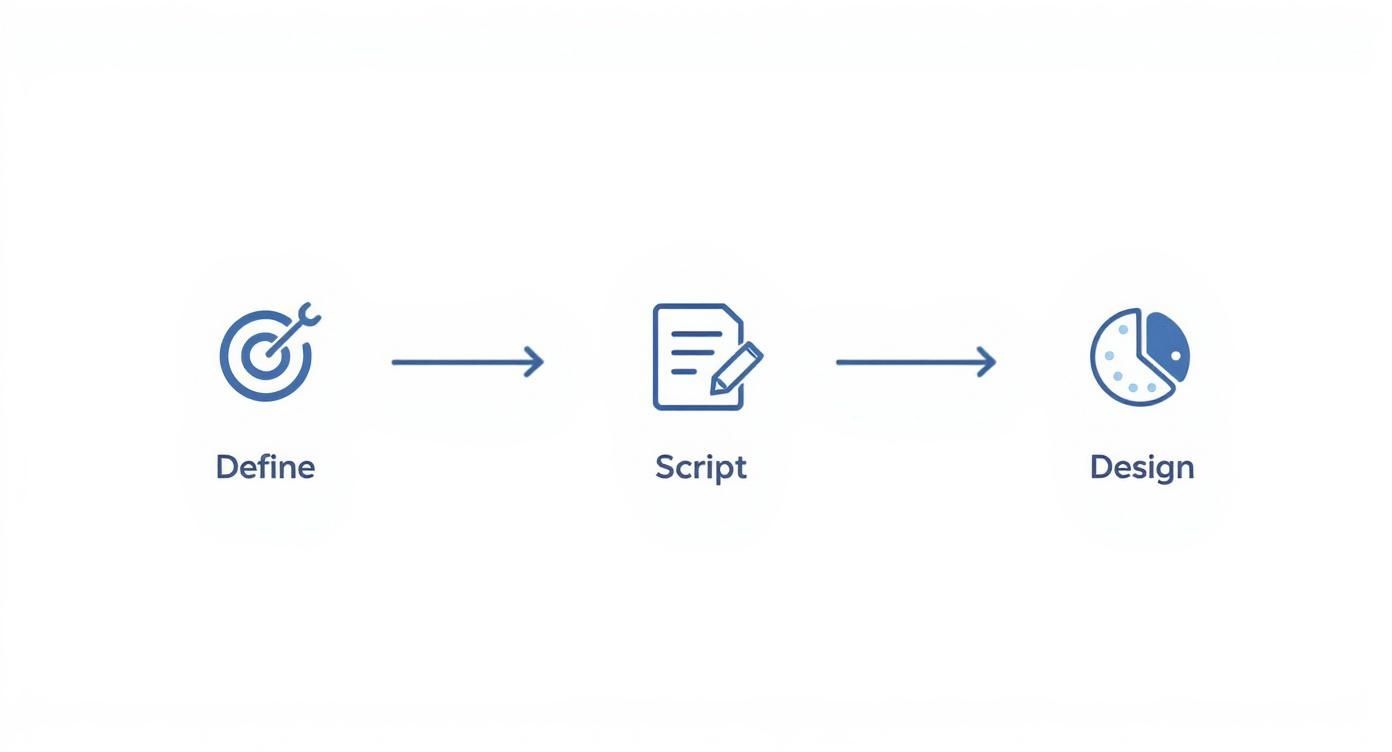
This process—defining your goals, scripting the action, and locking in the design—is the foundation. Get this right, and adapting to any platform becomes infinitely easier.
Composing for the Vertical Frame
Vertical video completely changes the rules of composition. With so little horizontal real estate, you're forced to get up close and personal. Forget those sweeping wide shots; they just don't have the same punch when crammed into a 9:16 frame.
Instead, lean into tighter framing. Think medium shots and close-ups that command the viewer's attention and create a more intimate feeling.
The best vertical content feels like it was made just for your phone. It's a personal viewing experience, and your composition needs to play into that.
Of course, getting the technical specs right is crucial. For a comprehensive look at the numbers, a creator's guide to vertical video dimensions is a fantastic resource that breaks down the exact requirements for Reels, TikTok, and Shorts.
Smart Workflows for Multiple Formats
Let's be real: no one has time to create a completely new animation for every single platform. The secret is to work smarter, not harder. Design a single master animation and then adapt it.
Here’s a workflow that has saved me countless hours:
- Start with a 1:1 (square) or 4:5 (portrait) aspect ratio for your main design. This is your "safe center" where all the important action happens.
- Once that core animation is locked in, extend the canvas vertically to 9:16 for Stories and Reels.
- Fill the extra space at the top and bottom with secondary background elements, textures, or subtle gradients.
This approach guarantees your key message is always front and center, no matter where it's viewed.
This kind of adaptable, mobile-first content is what's driving incredible growth in the industry. The global motion graphics market, valued at $98.3 billion in 2025, is expected to skyrocket to $280 billion by 2034, almost entirely because of our appetite for online video. An efficient workflow isn't just a nice-to-have; it's essential for keeping up. To see how others are tackling this, you can check out some of the best video editing apps for TikTok that are built around this fast-paced, multi-format world.
Core Animation Techniques That Grab Attention
With your plan locked in, it’s time to bring your graphics to life. But remember, not all motion is good motion, especially when you’re fighting for attention in a crowded social feed. Your goal is to create movement that feels deliberate, looks polished, and, most importantly, stops a user’s thumb within the first three seconds.
Winning with motion graphics for social media isn't about throwing every flashy effect you know at the screen. It's about smart, subtle animation that serves the message. The single most powerful concept you need to master is easing.
Instead of an object just zipping across the screen at a constant, robotic speed, easing adds acceleration and deceleration. This small change makes a massive difference, mimicking real-world physics and transforming clunky animations into something that feels incredibly smooth and professional.
Easing Into Engagement
Think about how a car stops at a red light. It doesn't instantly halt from 60 mph; it gradually slows down. Applying that same logic to your on-screen elements is a total game-changer.
- Ease In: Perfect for an object just entering the frame or starting a movement. It begins slowly and then ramps up its speed.
- Ease Out: Use this when an object is coming to a stop or exiting the scene. It moves at full speed and then gently slows to a halt.
- Ease In & Out: This is your go-to for most movements that happen mid-scene. It creates a beautiful, natural arc of motion from start to finish.
Almost any animation software, from After Effects to Canva, has built-in easing presets. Just playing around with these will immediately level up your work, making even a simple text reveal look worlds better.
The secret to professional-looking motion isn't adding more effects; it's refining the movement you already have. Smooth easing is the invisible force that separates amateur work from polished, high-end content.
Creating Thumb-Stopping Reveals
How you bring elements onto the screen is just as important as the elements themselves. A well-timed reveal of text or an image can build intrigue and keep people glued to your video.
For instance, when you’re animating a headline, don’t just fade it in. Try a staggered reveal, making each word appear one after the other. It’s a simple trick, but it forces the viewer's eye to follow along, actively engaging their brain and making the message stick. The same logic applies to products. Instead of just showing the final item, you can animate its different components into place to build excitement.
The Power of Isolation and Composition
Sometimes, the best way to make your subject pop is to completely separate it from its background. For years, this meant messing with green screens and complex editing software. Not anymore.
Tools like VideoBGRemover have made this process ridiculously simple. You just upload a video, and its AI instantly cuts out the background, leaving you with a clean, isolated subject.
This unlocks a ton of creative freedom. You can drop your subject onto a custom animated background, have text fly in behind them, or even build unique collages using several isolated video clips. It’s a fantastic technique for product videos and expert interviews where the focus needs to be laser-sharp. You get a high-production look without the headache and cost of a traditional studio setup.
Exporting for Flawless Social Media Playback
https://www.youtube.com/embed/n8bgxaFztW0
It’s a painful moment for any creator: you spend hours crafting the perfect animation, only to see it turn into a pixelated mess once you upload it. This is where your export settings come in. This final, technical step is the bridge between your editing software and a pristine viewing experience on someone's phone.
Getting this right is all about striking a careful balance. You’re essentially negotiating between visual quality and file size. You need your video to look sharp, but if the file is too big, social platforms will aggressively compress it, often with ugly results.
Choosing the Right Codec and Bitrate
For pretty much any motion graphic you’re putting on social media, H.264 (AVC) is your go-to codec. It’s the universal standard for a reason—it delivers fantastic quality without creating enormous files, making it perfect for the web.
After the codec, your next big decision is the bitrate. This number dictates how much data is packed into each second of your video. A higher bitrate means better quality and a bigger file. If you set it too low, you'll start to see blocky artifacts and color banding, especially in fast-moving scenes or smooth gradients.
Here are some solid starting points I use in my own workflow:
- For Instagram Reels & TikTok (1080p): I aim for a target bitrate between 10-15 Mbps. This seems to be the sweet spot that keeps fine details looking crisp without making the file unnecessarily large for these platforms.
- For LinkedIn & General Feed Posts: You can usually get away with a bit less. A range of 8-12 Mbps is typically more than enough for high-quality playback in the feed.
It can feel like a bit of a dark art at first. If you want to really get into the weeds, our guide on video compression without losing quality breaks down the more advanced techniques.
Your export is the final handshake with the social media platform. Handing it a well-optimized file in a format it expects is the best way to ensure your content is displayed exactly as you intended.
Handling Transparency and Audio
What if you're not exporting a full video, but an animated overlay like a lower third or a logo bug? In that case, you need a transparent background, and a standard MP4 file just won't cut it. You need a format that supports an alpha channel (which is what holds the transparency information).
Your best bets for this are:
- ProRes 4444: This is the undisputed king for quality transparent video, but be warned—the files are massive. It’s great for professional workflows but might be overkill for social media.
- WebM (VP9): A much more modern, web-friendly option. It supports transparency and keeps file sizes way down, making it a fantastic choice.
- PNG Sequence: Instead of a video file, you export a series of transparent PNG images. This works beautifully for short, complex animations.
Before you hit that final render button, remember the sound-off experience. With a staggering 85% of users watching social videos on mute, burned-in captions are no longer optional—they’re essential. Make sure your final version has open captions styled to fit your brand.
This is where motion graphics really excel, delivering your message visually and effectively in just a few seconds. And with 51% of marketers now using AI tools in their video creation process, getting these polished, accessible assets out the door is faster than ever. You can discover more insights about motion graphics and engagement on thebelfortgroup.com.
Recommended Export Settings for Major Social Platforms
To make things easier, I've put together a quick-reference table with the settings I typically use for the major platforms. Sticking to these recommendations will give you a great starting point for ensuring your videos look their best everywhere.
| Platform | Recommended Codec | Resolution (for 9:16) | Frame Rate (fps) | Target Bitrate (Mbps) |
|---|---|---|---|---|
| H.264 | 1080 x 1920 | 30 | 10 - 15 | |
| TikTok | H.264 | 1080 x 1920 | 30 | 12 - 15 |
| H.264 | 1080 x 1920 | 30 | 8 - 12 |
While each platform has its own nuances, these settings provide a reliable baseline. Always double-check your final upload to ensure it looks as good on the platform as it did in your editor.
Got Questions? We’ve Got Answers.
As you start making your own motion graphics, you're bound to run into some questions. It happens to everyone. From figuring out which software to use to the legal stuff around music, getting some clear answers upfront can save you a ton of headaches later. Let's tackle some of the most common ones I hear.
What's the Best Software for Social Media Animations?
Honestly, there's no single "best" tool—it's all about finding the right tool for you. It really boils down to your skill level, budget, and the kind of work you're trying to do.
If you're just starting out or you're a marketer needing to get things done fast, you can't go wrong with tools like Canva Pro or Adobe Express. They’re built for speed with drag-and-drop interfaces and a mountain of templates sized perfectly for social media. It’s a great way to make something look good without a steep learning curve.
On the other hand, if you're a creative pro who needs total control, Adobe After Effects is still the king. When you combine it with Adobe Illustrator for your graphics and Photoshop for your images, you have a complete powerhouse setup to create literally anything you can dream up.
How Long Should a Social Media Motion Graphic Be?
Keep it short. Seriously. For fast-paced platforms like Instagram Reels and TikTok, you're aiming for the 15 to 30-second mark. If you're creating an in-feed post or an ad for somewhere like Facebook or LinkedIn, you can stretch it a bit, but I'd still try to keep it under 60 seconds.
The real make-or-break moment is the first three seconds. That’s your entire window to stop the scroll. You have to land your main hook and your most eye-catching visual almost instantly, or they're gone.
Where Can I Find Music for My Videos?
This is a big one. Grabbing a popular song off the radio is a surefire way to get your video muted or even taken down for copyright infringement. To play it safe and keep your content live, you need to stick with royalty-free music.
Here are a couple of solid, legal options:
- Subscription Services: I'm a big fan of platforms like Epidemic Sound and Artlist. You pay a monthly or yearly fee and get access to huge libraries of incredible music and sound effects you can legally use.
- Platform Libraries: Apps like Instagram and TikTok have built-in music libraries, which are convenient. But be careful—read the terms. A lot of that music is cleared for personal use, but using it in branded or commercial content can get you into trouble.
How Much Does It Cost to Create Motion Graphics?
The price tag can swing wildly from basically free to thousands of dollars. It all comes down to how you go about it.
- The DIY Route: If you use a tool like Canva, your main cost is your own time plus a small subscription fee. This is hands-down the most affordable way to get started.
- Hiring a Freelancer: A good freelance animator will probably charge anywhere from a few hundred to a couple of thousand dollars for a short social video. The price depends on their experience and just how complex the animation is.
- Working with an Agency: This is the premium option. Going with an agency means you're paying for the whole package—strategy, scripting, storyboarding, and the final animation.
My advice? Start small. Use the DIY tools to experiment and see what your audience responds to. Once you start seeing a return on your efforts, you can justify a bigger investment.
Ready to create stunning, professional-looking videos without the hassle of a green screen? VideoBGRemover uses AI to instantly remove and replace your video background, giving you studio-quality results in minutes. Start creating for free today at videobgremover.com.
Tagged with
Ready to Remove Your Video Background?
See a free preview before you buy.
No credit card required • Free preview on every video