A Guide to Green Screen Video Editing Software
Discover the best green screen video editing software for any project. Learn how chroma key and new AI tools can transform your video backgrounds effortlessly.
Ever wonder how creators transport themselves from their bedroom to a bustling city street or a serene beach with just a few clicks? That's the power of background removal, a video editing trick that's no longer just for Hollywood blockbusters. It’s a game-changer for anyone looking to make professional, engaging content right from home.
The Magic of Swapping Your Video Background
Being able to control your virtual environment is one of the most powerful tools a content creator can have. Whether you're a YouTuber, a social media marketer, or an online educator, swapping out your background gives you incredible creative freedom. It instantly boosts your production value without the hassle and cost of shooting on location or building elaborate sets.
This guide will break down the two main ways to pull off this effect. We'll look at the old-school methods versus the newer, smarter tech to help you figure out what's best for your workflow.
Two Paths to a Perfect Backdrop
First up is the classic approach: traditional green screen video editing software. This technique, professionally known as chroma keying, is what most people picture. You film someone in front of a solid-colored screen (usually bright green or blue), and then the software digitally removes that specific color, leaving a transparent area where you can drop in a new background. To get it right, this method requires a physical screen and some careful lighting.
The second path is through AI-powered tools, which don't need a physical green screen at all. Innovative platforms like VideoBGRemover use artificial intelligence to analyze the footage and intelligently separate the person from any background, no matter how cluttered it is. This means you can film in your living room, a busy coffee shop, or even your backyard and still get a clean, professional cutout.
The goal is no longer just about removing a background. It’s about doing it quickly, precisely, and with almost zero setup, so creators can spend more time on their story and less on technical headaches.
We’ll walk you through how both methods work, side-by-side, so you can pick the right tool for your next project. Once you understand the fundamentals of both chroma key and AI, you'll be ready to create stunning videos for Instagram Reels, YouTube Shorts, online courses, or slick-looking ads, making high-end results easier to achieve than ever before.
Chroma Key vs. AI: How Does Background Removal Actually Work?
Let's pull back the curtain and see how video backgrounds magically disappear. There are two main ways to get this done: the old-school green screen method, known as chroma keying, and the new-school approach using AI. They both get you to a similar destination, but they take completely different roads to get there.
The Traditional Green Screen Method (Chroma Key)
You’ve definitely seen this in action. Think of a TV weather forecaster pointing at a map that isn't really there. They're standing in front of a bright green wall, and the software is doing all the heavy lifting.
Chroma key software is programmed to hunt down every single pixel of that specific shade of green and make it transparent. Once those green pixels are gone, you can slide any other image or video right in behind the subject. It’s effective, but it’s also a bit of a diva. It demands a perfectly controlled environment: a physical screen, perfectly even lighting (no shadows!), and the right camera settings. Get any of that wrong, and you'll spend hours cleaning up fuzzy edges in post-production. For a deeper dive into the nitty-gritty, check out our guide on how to use a chroma key online.
The Modern Approach: Smart AI Cutouts
AI-powered background removal is a whole different ballgame. Instead of looking for a specific color, tools like VideoBGRemover act more like a highly skilled digital artist, meticulously cutting out the subject from its surroundings.
These advanced algorithms have been trained on millions of images and videos, teaching them to understand the difference between a foreground subject—like a person, a pet, or a product—and whatever is happening in the background. It doesn't matter if you're in a messy office, on a busy street, or in front of a brick wall. The AI intelligently identifies the subject and creates a precise cutout, no green screen required.
This flowchart maps out the two very different workflows.
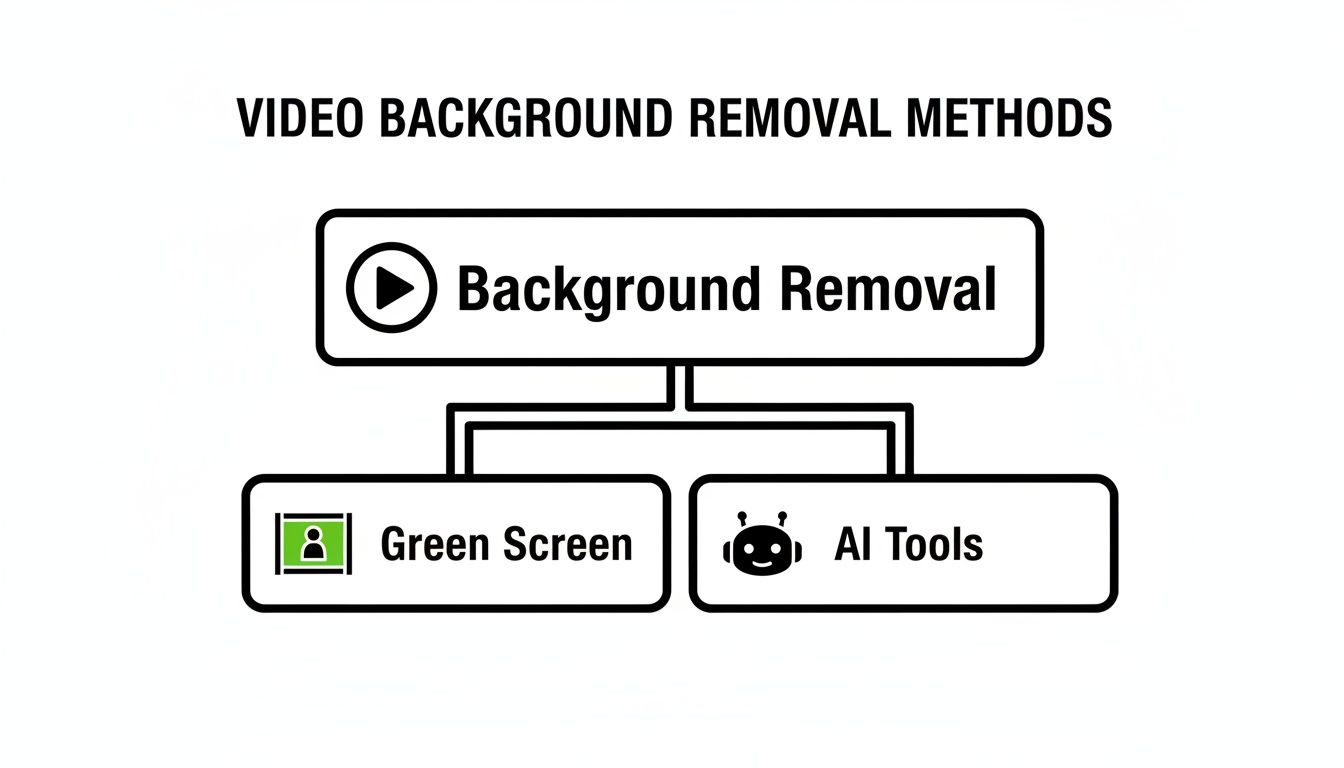
As you can see, one path relies on color, while the other relies on pure intelligence.
Comparing Chroma Key and AI Background Removal
To make it even clearer, let's break down the key differences between the two methods head-to-head.
| Aspect | Traditional Green Screen (Chroma Key) | AI Background Removal (e.g., VideoBGRemover) |
|---|---|---|
| Requirements | Physical green screen, controlled studio lighting, specific camera settings. | Just a video file. No special equipment or setup needed. |
| Setup Time | Can be time-consuming to set up the screen and lights perfectly. | Virtually none. Just upload your video. |
| Flexibility | Limited to shooting in a studio or wherever the screen is set up. | Shoot anywhere, anytime. Your background doesn't matter. |
| Post-Production | Often requires manual cleanup (keying, spill suppression) to fix imperfections. | Fully automated. The AI handles the complex cutout process. |
| Best For | High-end film production, news broadcasts, controlled studio shoots. | Social media content, ads, tutorials, remote work, quick turnarounds. |
| Biggest Drawback | The setup is rigid, costly, and requires a dedicated space. | Quality can depend on the AI's training and video complexity. |
While both have their place, it's clear that AI offers a level of freedom and convenience that's a game-changer for most modern creators.
Why The Market Is Shifting
The demand for great video content is exploding, and the numbers prove it. The global market for green screen production kits was valued at USD 450 million recently and is on track to hit USD 1.2 billion by 2033. That’s a staggering 12.5% annual growth rate, showing just how critical background replacement has become.
But here’s the interesting part: while the market for physical green screens is growing, the rise of AI provides a far more flexible path for the modern creator who needs to produce polished content without being tied to a studio.
AI-powered tools meet this demand head-on by offering a screen-free solution that saves time, space, and money. For anyone creating Reels, online courses, or product ads, the power to remove a background from any video, anywhere, is a massive creative advantage.
How AI Is Reshaping Video Editing
The explosion of AI in video production is doing a lot more than just letting you swap out your background. It’s making truly advanced editing tools accessible to pretty much everyone. Features that once demanded years of training and a small fortune in software are now, quite literally, a one-click affair.
This shift completely changes the game for creators. You no longer have to be a technical wizard to get professional-looking results. AI-powered tools are built to handle the tedious, repetitive work that used to be a massive roadblock for anyone just starting out.
The Brains Behind the Background Removal
So, how does an AI tool actually tell the difference between the wisps of your hair and the tree branches behind you? It all boils down to machine learning. These AI models are trained on gigantic datasets filled with millions of images and video clips. This process teaches them to recognize patterns, objects, and context with stunning precision.
Think of it like this: you can spot a dog in a photo instantly because you've seen thousands of dogs in your life. An AI model does the same thing, but it learns from a library of data that's almost unimaginably vast. It learns to identify a person, an object, or an animal and then cleanly isolates it from its surroundings—achieving a level of detail that once required an editor to manually trace around the subject, frame by painstaking frame.
This intelligent separation saves creators an enormous amount of time. It also produces much cleaner cutouts than older green screen software ever could, especially when your lighting or background isn't perfect.
Making Pro-Level Video Production Available to All
This isn't just a small tweak for a niche market; it's a massive shift. While the overall video editing software market was recently valued at USD 2.14 billion and is expected to hit USD 3.16 billion by 2032, the AI-powered slice of that pie is growing even faster. That segment is projected to climb from USD 623.7 million to USD 1,032.0 million in the same timeframe, which clearly signals a major move toward smarter, automated editing tools.
This trend reflects a simple truth: creators want studio-quality video without the studio-level complexity or budget. AI is finally making that a reality.
AI doesn't replace your creativity; it just gets rid of the technical headaches that get in the way. By taking care of the complicated background removal, it frees you up to focus on what really matters—your story, your message, and your delivery.
Tools like VideoBGRemover are quickly becoming a go-to for anyone needing to create polished content on a tight schedule and budget. To see just how much AI is changing the craft, it's worth exploring some of the best AI video editing software picks available today. Whether you're making ads, tutorials, or social media content, these tools put incredible post-production power right at your fingertips, no green screen needed.
A Practical Guide to AI Background Removal
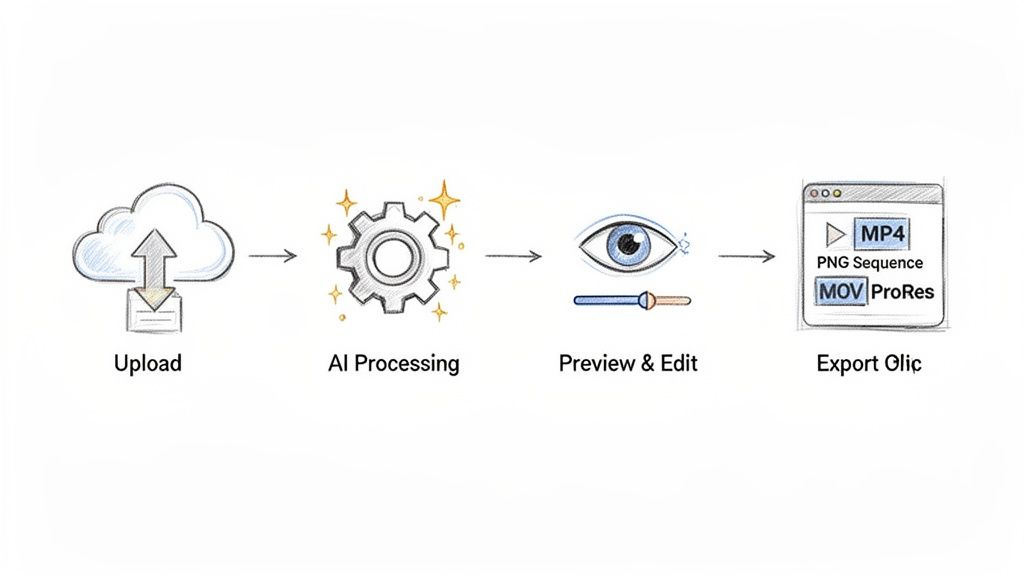
Modern AI tools have completely changed the game for removing video backgrounds. Forget the tedious process of fiddling with timelines, tweaking confusing settings, or meticulously keying out colors. The new workflow is simple, fast, and doesn't demand any technical wizardry, freeing you up to focus on the creative side of things.
The whole process is incredibly straightforward, usually just a few clicks from start to finish. You don’t need powerful green screen video editing software anymore; just grab your video file, get online, and you're good to go. This makes professional-looking results achievable for pretty much anyone.
Step 1: Upload Your Footage
The first step couldn't be easier. Just drag and drop your video file right into the tool. Most modern platforms, including our own VideoBGRemover, are designed to handle all the common video formats like MP4, MOV, and WebM. That means you can pull footage straight from your phone, a pro camera, or a screen recording without having to convert anything first.
Step 2: Let the AI Work Its Magic
Once your video is uploaded, the AI gets to work. This is where the real magic happens. The system scans your footage frame by frame, using a highly trained model to precisely distinguish your main subject from everything behind it. There are no sliders to mess with or settings to configure—it's completely automated. In just a few minutes, you’ll have a clean cutout ready for the next step.
Step 3: Preview and Customize
After the AI finishes processing, you'll see a exact price shown before processing of your video with the background gone. This is your chance to look it over and make sure the cutout is just right. From there, you can slap in a new background—whether it’s a solid color, a still image, or even another video—all within the tool. This instant feedback lets you experiment and make quick changes without any commitment.
Step 4: Export for Any Project
This is where you unlock some serious creative freedom. Once you're happy with how it looks, you can export your video in the format that best fits your project. What you choose here really depends on where the final clip is headed.
You have two main options when exporting:
Standard MP4: This is your go-to for sharing right away. If you've already added a new background and your video is ready for the world, an MP4 file is universally accepted on social media platforms like Instagram Reels, YouTube Shorts, and TikTok.
Transparent Formats: Now this is the real game-changer for editors and creators who need more control. Exporting with a transparent background lets you seamlessly layer your subject into more complex video projects.
Think of a transparent video like a digital sticker. The subject is perfectly cut out, and everything else is completely see-through, letting you place it over other videos, graphics, or animations without any background getting in the way.
To pull this off, the video file needs an alpha channel—extra data that tells editing software which parts of the frame should be transparent. Professional formats that support this include:
- MOV ProRes 4444: A high-quality codec used across the professional video world. It preserves every bit of detail and, most importantly, that transparent alpha channel.
- PNG Sequence: This option exports every single frame of your video as a separate, high-quality PNG image with a transparent background. It gives editors maximum flexibility for heavy visual effects and compositing work.
Choosing a transparent export is a must for anyone working with advanced green screen video editing software like Adobe Premiere Pro or Final Cut Pro. It turns a simple AI tool into a powerful asset generator, streamlining professional workflows and saving hours of painstaking manual labor.
Real-World Examples of Background Removal in Action
Alright, let's step away from the technical side of things and see how these tools are actually making a difference for creators. The power to instantly swap out a background isn't just a cool party trick—it's a game-changer that saves serious time, slashes production costs, and opens up a whole new world of creative options.
This is especially true for creators who live on their phones. The market for video editing apps is already worth USD 776.8 million and is expected to rocket to USD 1,645.8 million by 2035. That explosion is fueled by the endless demand for slick content on platforms like TikTok and Reels, a trend you can see in recent market growth reports.
Dynamic Ads for Social Media Marketers
Picture this: you’re a marketer launching a new product. In the old days, you’d have to book photoshoots at a dozen different locations—a beach, a busy city street, a quiet coffee shop. That gets expensive fast, and it’s a logistical nightmare.
Now, with AI background removal, you can film your product once against a plain wall. From there, you can drop it into countless virtual settings, turning a single recording into an entire ad campaign. It also means you can A/B test different backgrounds in minutes to see which one grabs your audience's attention the most.
Engaging Content for Online Educators
If you create online courses, you know that keeping students engaged is half the battle. Instead of being a tiny talking head in the corner of a slide deck, you can remove your background and place yourself right inside your presentation.
This simple change makes the whole experience feel more immersive and personal. It’s like you’re in the room with the student, walking them through the concepts. A boring lecture suddenly becomes a dynamic tutorial, which is a huge win for keeping students focused and helping them learn.
By getting rid of the distracting physical background, you build a much stronger connection with your audience—whether they're students, customers, or followers.
Streamlined Workflows for Professional Editors
Even for the pros who live in high-end green screen video editing software, AI tools are a massive time-saver. Manually rotoscoping—the painstaking process of tracing an object frame by frame—can take hours for just a few seconds of video. It's tedious, mind-numbing work.
Tools like VideoBGRemover can knock out a high-quality transparent export, like a MOV ProRes file or a PNG sequence, in just a few minutes. An editor can then take that perfectly clean clip and drop it straight into their main project in Adobe Premiere Pro or Final Cut Pro, skipping hours of manual labor.
Clean Overlays for Streamers and UGC Creators
User-generated content (UGC) creators and gamers need a clean, professional-looking "facecam" for their streams. A messy bedroom in the background just looks amateur and distracts from the main content.
Background removal lets them create a perfect cutout of themselves to overlay on their gameplay or reaction videos. This gives their content that polished, studio look without needing a physical green screen, which most people don't have the space for at home. Each of these examples shows how these tools are helping creators of all kinds make better content, faster than ever before.
Shooting Tips for a Flawless Cutout
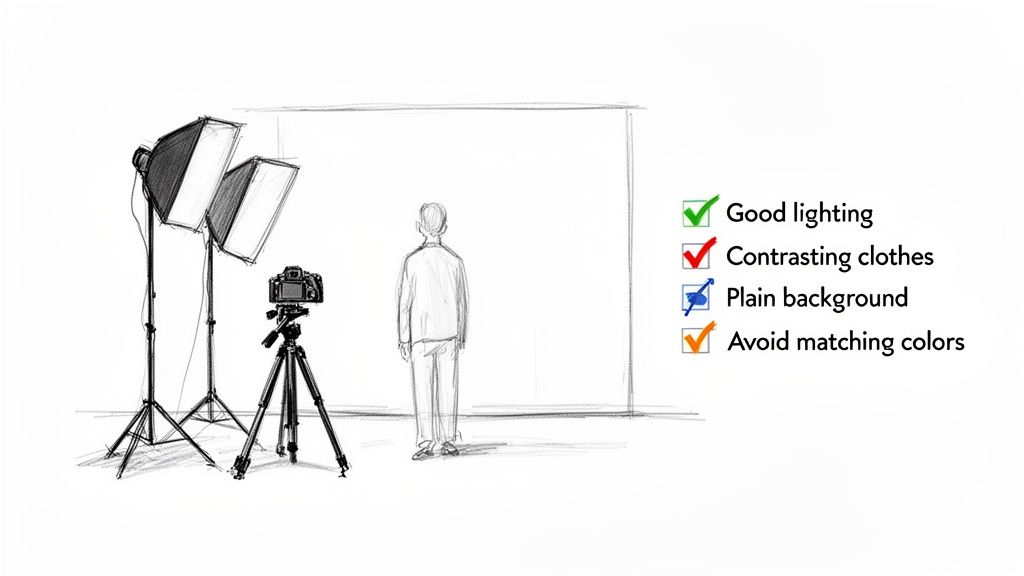
Whether you're using traditional green screen video editing software or a powerful AI tool, the secret to a great final video starts way before you hit "export." The quality of your cutout is almost entirely decided by how you shoot the original footage.
Think of it this way: you're giving the software a clear map to follow. The better the map, the cleaner the final result. These simple techniques aren't about spending a ton of money; they're about working smarter to make sure your subject looks sharp and natural in their new setting. A little planning goes a long way.
Master Your Lighting
Lighting is, without a doubt, the single most important element for a clean cutout. Your entire goal is to create a crisp, clear separation between your subject and the background. This makes it incredibly easy for any software to find the edge.
With a classic green screen, this means you light the screen and your subject separately. The screen itself should be lit as evenly and flatly as possible—no shadows, no bright hot spots. A couple of soft lights, one on each side, usually works perfectly.
If you're relying on AI, the principle holds true. While you don't have a screen to worry about, you still need to light your subject well to define their edges. A standard three-point lighting setup (key, fill, and backlight) works wonders. It makes the subject "pop" right off the background, giving the AI a ton of information to work with.
Optimize Your Environment
Your shooting space has a huge impact, especially if you’re ditching the physical green screen. A few smart choices here will save you a world of headaches in the editing room.
Avoid Busy Backgrounds: Sure, modern AI is smart, but why make its job harder? Shooting against a plain, uncluttered wall gives the software a much cleaner signal to analyze, reducing visual noise and potential errors.
Mind the Wardrobe: This is a classic green screen rule for a reason. Don't wear green! The software might see your shirt as part of the background and erase it. For AI tools, it’s best to wear colors that have a strong contrast with whatever is behind you.
Create Distance: When using a physical green screen, place your subject at least 6-10 feet in front of it. This simple step is crucial for preventing "spill," which is when the green color from the screen reflects onto your subject, creating an ugly green halo that’s tough to remove.
Pro-Tip: After you get your cutout, add a tiny bit of "edge feather" in your editing software. This softens the hard edge just enough to make your subject look like they're in the new background, not just stuck on top of it.
Nailing these simple steps ensures that any green screen video editing software or AI tool can do its best work, giving your project that polished, professional look. For a deeper dive into setting up your shot, you can learn more about filming for a background green screen video.
Choosing Your Path in Video Editing
So, when it comes to editing, should you stick with a traditional green screen setup or jump into the world of AI? Honestly, it really depends on what you’re trying to create.
Classic green screen video editing software still has its place, especially for big-budget productions. If you’re a filmmaker with a controlled studio and you need absolute, pixel-perfect precision for a complex composite shot, the old-school method gives you that granular control.
But let's be real—that’s not the reality for most of us anymore.
The Modern Creator’s Choice
For the majority of creators today, from marketers cranking out social media ads to educators filming online courses, the game has changed. Speed and flexibility aren't just nice to have; they're essential. This is where AI-powered tools completely change the dynamic, knocking down the usual barriers of expensive gear, dedicated space, and steep learning curves.
The future of content creation is faster, more intuitive, and doesn't require a specific color of fabric hanging behind you. AI background removal means you can shoot literally anywhere, adapt your content on a whim, and get a polished final product without all the usual headaches. It lets you put your energy back where it belongs: on your story and your message.
The best tool is simply the one that removes obstacles between your idea and your final video. For modern content, that increasingly means leaning on AI to handle the complex technical work automatically.
If you're still weighing the pros and cons, diving into a detailed video editing software comparison can give you a clearer picture of which workflow fits your projects.
At the end of the day, the only way to really know is to try it for yourself. Give an AI tool a shot on your next video and see just how easy it is to get professional-looking results. The freedom of ditching the green screen for good might just change how you think about making videos.
Your Top Questions, Answered
Got some lingering questions about green screen software or how AI background removal actually works? Let's dive in and tackle some of the most common ones I hear from creators.
Is a Physical Green Screen Still Necessary?
Honestly, for most people making content for social media, ads, or online courses today, the answer is a resounding no. An AI tool like VideoBGRemover completely sidesteps the need for a physical setup. This saves you a ton of hassle—no lighting, no stands, no wrinkles to worry about—and you can still walk away with a super clean, professional-looking result.
What Exactly Is a Transparent Video Format?
Think of it like a digital sticker. A transparent video format includes an 'alpha channel', which is basically a layer of information that tells your editing software which parts of the video are supposed to be see-through. This is crucial when you want to place your subject on top of another video clip or graphic inside a program like Premiere Pro or Final Cut Pro.
The two workhorses for this are MOV ProRes 4444 and PNG Sequences. If you’re serious about quality and flexibility in your video editing, these are the formats you'll want to use.
Can AI Really Handle Tricky Details Like Hair?
Yes, and this is where modern AI often shines. These tools are trained on millions of images, so they've learned to distinguish between a person and their background with incredible accuracy. In my experience, a good AI often does a better job isolating wisps of hair or handling motion blur than traditional chroma keying, which can leave you with those ugly green halos or jagged edges that take forever to fix manually.
Is AI Background Removal Actually Affordable?
It absolutely is. A lot of AI services, including ours, are built on a pay-as-you-go model. This is a game-changer because it means anyone can tap into this powerful tech without getting locked into a pricey monthly subscription. Whether you're making one video or a hundred, it’s a really accessible and budget-friendly way to get professional-grade results.
Ready to see for yourself how easy it is to ditch the green screen for good? Give VideoBGRemover a try. You can create polished, professional videos in just a few minutes. Start for free on videobgremover.com.
Tagged with
Ready to Remove Your Video Background?
Upload your video and see the exact price before processing.
No subscription • Exact price before processing