Unlocking YouTube Shorts Monetization Requirements
Struggling with the YouTube Shorts monetization requirements? This guide breaks down the rules, revenue, and strategies you need to start earning today.
Ready to start earning from your YouTube Shorts? The first step is getting into the YouTube Partner Program (YPP), and there are now two distinct ways to get your foot in the door.
You'll need 1,000 subscribers no matter which path you take. After that, you have a choice: either hit 10 million valid public Shorts views in the last 90 days or rack up 4,000 public watch hours on your regular, long-form videos in the last 12 months.
Hitting one of these benchmarks is your golden ticket to applying for the YPP and turning your creativity into cash.
Your Two Paths to YPP Eligibility
Before a single ad can run on your Shorts and generate revenue, your channel needs to be accepted into the YouTube Partner Program. Think of the YPP as the official club for creators who are serious about earning money.
For years, this club was built around traditional, long-form video creators. But with Shorts taking over, YouTube opened up a brand-new fast track just for short-form specialists.
This means you have two routes to the same destination. You only need to meet the requirements for one of them, not both. This flexibility is fantastic because it lets you focus on the format you do best, whether that’s quick, viral clips or deep-dive videos.
The Shorts-Focused Path: The Sprint
This one is built for speed and pure, explosive growth. If you're all about vertical video, this is your lane. The magic numbers are 1,000 subscribers and 10 million public Shorts views within a 90-day window.
I know, 10 million views sounds like a massive number. But the nature of Shorts is that one video can catch fire and pull in millions of views in just a weekend. This path is all about consistency, jumping on trends, and creating content that's instantly shareable. It's a sprint to the finish line.
The Traditional Path: The Marathon
The classic route is more of a long game. It’s for creators who focus on building a library of longer videos that keep people watching. Here, the goal is to hit 1,000 subscribers and accumulate 4,000 hours of public watch time over the past 12 months.
This is a marathon. It rewards in-depth content where viewers stick around for a while. Your Shorts can still play a huge role here—they’re perfect for creating trailers or highlights that drive traffic to your longer videos, helping you build that loyal subscriber base and chip away at the watch-time requirement. For more strategies on this, you can check out our other guides on how to monetize YouTube Shorts.
To really spell it out, let’s look at the two options side-by-side.
Your Two Paths to YPP Eligibility
This table breaks down exactly what you need to qualify for the YouTube Partner Program, depending on whether you're a Shorts creator or a traditional vlogger.
| Requirement | Shorts-Focused Path | Traditional Path | Key Timeframe |
|---|---|---|---|
| Subscribers | 1,000 | 1,000 | Ongoing |
| Performance Metric | 10 Million Public Shorts Views | 4,000 Public Watch Hours | N/A |
| Evaluation Period | Last 90 Days | Last 12 Months | Rolling |
Ultimately, choosing a path comes down to your content strategy. Do you want to go for a quick, viral win with Shorts or build a steady, long-term audience with traditional videos? The good news is, both roads lead to monetization.
How Your Shorts Earnings Are Actually Calculated
So, you’ve hit the YouTube Partner Program requirements. That’s the first major milestone, but now comes the part that feels like a black box to a lot of creators: how do those millions of views actually translate into dollars and cents?
It's not as simple as long-form videos. With traditional YouTube content, an ad plays directly before, during, or after your video, and you get a cut. Shorts monetization is a completely different beast. It operates more like a massive, shared community fund.
Think of it this way: every month, YouTube gathers all the money made from ads that run in the Shorts feed and puts it into one giant pot. It doesn't matter if an ad ran right before your specific Short; all the revenue is pooled together. This is the single most important thing to understand—you can't compare Shorts RPMs (revenue per mille) to long-form RPMs because the financial models are fundamentally different.
This flowchart breaks down the two main roads you can take to get into the YouTube Partner Program (YPP), which is your ticket to getting a piece of that revenue pie.
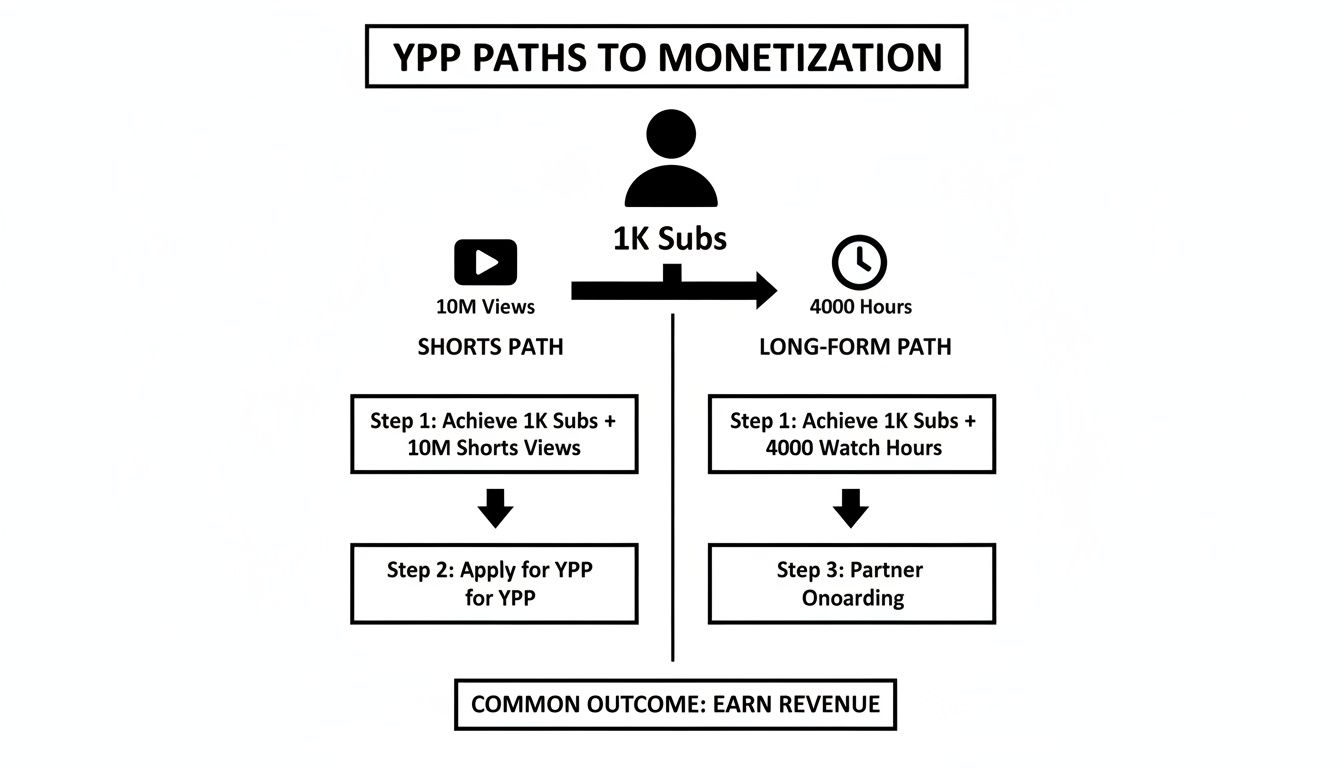
As you can see, whether you qualify with 10 million Shorts views or 4,000 long-form watch hours, you still need that baseline of 1,000 subscribers. Both paths lead to the same destination: YPP eligibility.
The Creator Pool Explained
Before that giant pot of ad money gets divided up among creators, YouTube has to pay the bills. The first thing they do is carve out a slice to cover music licensing costs. This is actually a massive perk for creators, as it gives you access to a huge library of popular, trending songs you can use without getting hit with a copyright claim that demonetizes your work.
Whatever is left after the music industry gets its share is called the Creator Pool. This is the money that gets distributed to every single eligible, monetizing Shorts creator on the platform. Your job is to claim the biggest slice of that pool you possibly can.
How big is your slice? It’s directly tied to your share of the total views. Let’s say your channel’s Shorts were responsible for 1% of all monetized Shorts views across the globe this month. In that case, you get allocated 1% of the Creator Pool. It's a system designed to reward performance on a massive, competitive scale.
Your earnings aren't tied to a specific ad on your Short. Instead, they represent your share of the total ad revenue generated across the entire Shorts ecosystem, making your performance relative to every other creator.
The Four-Step Payout Process
Getting from a view to cash in your bank account is a clear, step-by-step journey. The whole system is built on this unique revenue pooling model, which is a major departure from the ad-sharing system we're used to on longer videos.
The process for distributing Shorts ad revenue is unique, pooling all earnings before paying out music licenses. The remaining Creator Pool is then distributed based on a creator's share of total views, with creators ultimately keeping 45% of their allocated portion. You can find a more detailed look into this unique revenue model at Usevisuals.com.
Here’s how it breaks down in four stages:
- Revenue Pooling: All the money from ads running in the Shorts feed gets collected into one central fund.
- Music Licensing: YouTube first pays music publishers from this fund to cover all the licensed tracks used in Shorts.
- Creator Allocation: The rest of the money—the Creator Pool—is assigned to creators based on their percentage of total valid Shorts views.
- Final Payout: Creators receive 45% of their allocated share. YouTube keeps the other 55%.
Factors That Influence Your Earnings
Because your income comes from a shared pot, a few big-picture factors can make your earnings swing up or down, even if your own view count remains steady.
- Viewer Location: This is a big one. Advertisers pay a premium to reach audiences in certain countries. Views from places with high ad spend, like the United States or the UK, contribute more money to the Creator Pool, making those views more valuable for everyone.
- Time of Year: Ad spending is seasonal. Brands open their wallets wide during the holiday season in Q4 (October-December), which inflates the size of the Creator Pool and can lead to a nice bump in earnings for creators.
- Total Platform Views: You're competing with every other Short on the platform. If your views are growing but the total number of views on all Shorts is growing even faster, your percentage of the pool might actually shrink.
Keeping this system in mind helps you set realistic expectations. Instead of obsessing over a single viral video, the key to winning at Shorts monetization is to consistently hold a significant share of the audience's attention, month in and month out.
So, you're chasing that magic 10 million view count to get your Shorts monetized. It can feel a bit confusing when you see your view count climb, but your progress toward the YouTube Partner Program (YPP) doesn't seem to match. What gives?
The answer lies in what YouTube calls "valid public Shorts views." Think of it this way: not all views are created equal in YouTube's eyes. They're looking for genuine, organic engagement, and their system is designed to filter out everything else.
Getting a handle on this is the most important step. Many creators get frustrated seeing big numbers in their analytics but feeling stuck. The trick is to know exactly which views push you closer to the finish line and which ones are just noise.
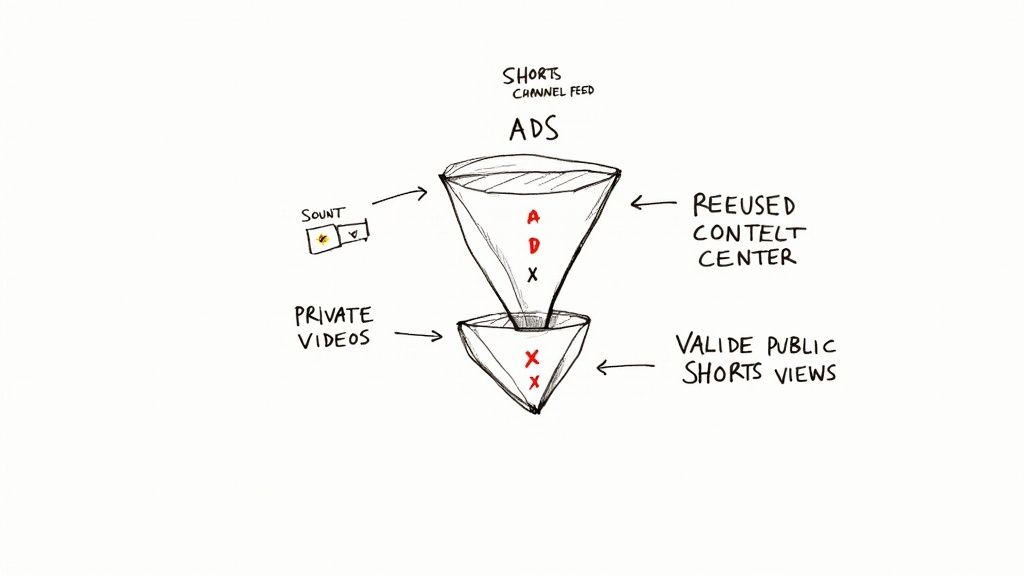
What Counts as a Valid Public View?
For a view to count toward that 10-million-view goal, it has to clear two simple hurdles: it must be from a public Short and it must be valid. It’s that straightforward.
- Public Views: This one's easy. Your Short's visibility must be set to "Public." If it's "Private" or "Unlisted," any views it gets won't be added to your monetization total.
- Valid Sources: This just means the view has to come from a place where people naturally find content on YouTube.
The big one here is the Shorts Feed—that endless, scrollable stream of vertical videos. That's where the vast majority of qualifying views come from. Views also count if someone watches a Short directly on your channel page, finds it via YouTube search, or clicks on it from the main "Shorts" tab. These are all organic discovery paths, and that's what YouTube wants to see.
Views That Do Not Count Toward Monetization
Now for the flip side. It’s just as critical to know what doesn't count, so you don't waste time or money on the wrong strategies. YouTube is pretty clear about excluding views that aren't organic.
Here’s a quick list of views that will not help you reach the YPP threshold:
- Ad Campaigns: If you're paying for views through Google Ads or other promotions, they won't count. YouTube needs to see that your content can attract an audience on its own.
- External Websites: Views from your Shorts embedded on a blog or another website don't count toward the 90-day tally. The viewer needs to be on YouTube's platform.
- The Stories and Short Videos Shelf: This is an older feature that's mostly phased out, but any lingering views from it are ineligible.
- Notification and Subscription Feeds: This might be surprising, but views from your subscribers' feeds or notifications currently don't count for the Shorts monetization requirement.
This is why creating genuinely good, shareable content is everything. You're not just trying to hit a number; you're trying to build an audience that will stick around. Shorts are fantastic for this. As a benchmark, a Short that hits 100,000 views can net you around 169 new subscribers. You can dive deeper into these kinds of stats on Shorts' growth potential at Voomo.ai.
By focusing your energy on making videos that people will discover and love in the Shorts feed, you ensure that every view you earn is actually moving you forward.
Applying for the YouTube Partner Program
Hitting your subscriber and view goals is a huge accomplishment, but it's really just the first step. Think of it as earning your ticket to the main event. Now, you actually have to get through the gate—and that means applying for the YouTube Partner Program (YPP).
This isn't just a rubber-stamp approval. The YPP application is a formal review where a real person at YouTube puts your channel under the microscope to make sure it aligns with all of their monetization policies. It’s less about your numbers and more about the quality, originality, and overall vibe of your content.
Kicking Off Your Application in YouTube Studio
The moment your channel crosses the finish line—either 10 million public Shorts views or 4,000 public watch hours, plus the 1,000 subscribers—you'll see a big "Apply Now" button pop up in the Earn tab of your YouTube Studio. This is where it all begins.
The application itself is a pretty straightforward process with a few key steps you have to complete.
- Review the Base Terms: First up, you’ll need to read and agree to the main YPP terms. This is the legal handshake between you and YouTube that lays out the rules of the partnership.
- Sign Up for Google AdSense: Next, the system will ask you to link a Google AdSense account. AdSense is how Google actually pays you. If you already have one, great. If not, you can create a new one right then and there.
- Get Reviewed: Once you’ve handled those first two items, your application is officially in the queue. Now it's a waiting game while YouTube's team does their thing.
This review typically takes about a month, give or take. Sometimes it's faster, but if they're swamped with applications, it can take a bit longer.
What YouTube’s Human Reviewers Look For
When a human reviewer gets to your channel, they’re not just double-checking your stats. They are digging into your content to see if it meets the spirit of the YouTube channel monetization policies. They're trying to answer one big question: Does this channel add real value to the platform?
To figure that out, they focus on a few key things:
- Main Theme: What’s your channel all about? Is there a clear, consistent focus?
- Most Viewed Videos: Your biggest hits get the most scrutiny because they represent your channel to the widest audience.
- Newest Videos: They’ll check your recent uploads to see what you're creating now and ensure the quality is still there.
- Biggest Proportion of Watch Time: Which videos are actually holding people's attention? This tells them what content is truly resonating.
- Video Metadata: Your titles, thumbnails, and descriptions are all fair game. They need to be accurate and not clickbaity or misleading.
The review is a holistic check of your channel's character. Reviewers are trained to spot the difference between channels that try to game the system and those that build an authentic home for their audience with original content.
Avoiding Common Rejection Reasons
A lot of creators get rejected, and it's rarely about their numbers. It’s almost always because their content runs afoul of two specific policies: reused content and repetitious content.
- Reused Content: This is a big one. It means you’re uploading stuff you didn’t make without adding anything significant yourself. Simply re-uploading viral TikToks, movie clips, or sports highlights is a fast track to rejection. You have to add significant original commentary, educational value, or a creative twist.
- Repetitious Content: This policy is aimed at channels that churn out tons of low-effort, cookie-cutter videos. Think of content that’s auto-generated or made from a simple template where only minor things change from video to video.
The best way to steer clear of these issues is to make sure every single Short has your unique fingerprint on it. Add your own voice, show your face, or offer a perspective that makes it truly yours. Your channel should feel like a genuine creation, not just a curated collection.
If you do get rejected, don't panic. You'll get feedback on what went wrong, and you have 30 days to fix the issues on your channel before you can apply again.
How to Get to 10 Million Views Faster
Sitting around waiting for the YouTube algorithm to bless your channel can feel like watching paint dry. Instead of just crossing your fingers for a viral hit, you can take control. A smart, focused strategy will get you to that 10 million view milestone a whole lot faster.
This isn't about trying to cheat the system. It's about learning what the system actually rewards and giving it exactly that: high-quality content that's also easy to find. That means keeping an eye on trends, fine-tuning every Short you post, and making sure everything looks as professional as possible.
Jump on Trends and Trending Audio
The quickest way to get noticed on the Shorts feed is to ride the wave of what's already popular. The algorithm is built to promote content that uses trending audio and formats because it knows viewers are already hooked.
Think of a trending sound as a massive, built-in audience just waiting for you. When you use it, your Short gets a ticket to show up in front of everyone interacting with that trend. Suddenly, your reach explodes far beyond your current subscribers.
Here’s how to do it right:
- Be a Student of the Feed: Seriously, spend some time every day just scrolling through Shorts. Notice which songs, sound bites, and video styles pop up over and over again.
- Check the Audio Library: When you go to create a Short and tap "Add sound," YouTube literally hands you a list of the top trending tracks. Use them!
- Make It Your Own: Don't just copy what everyone else is doing. The real magic happens when you adapt a trend to your own niche. A fitness creator could use a trending comedy sound to show a common workout mistake—it’s familiar, but fresh.
Optimize Every Single Short for Discovery
Once you’ve got a killer idea, you need to package it so both the algorithm and actual people can find it. This all comes down to the small but mighty details: your titles, hashtags, and thumbnails.
Your title needs to be short, snappy, and make people curious. It’s the very first thing they read, and it can be the difference between a watch and a scroll. A title like "You won't believe this trick" is way more effective than a flat "My new video."
Hashtags are also your best friend for getting sorted into the right digital bucket. A good mix is key.
- Always, always include #shorts. This is non-negotiable.
- Add 2-3 broader hashtags relevant to your video (e.g., #fitness, #cooking, #gaming).
- Throw in 1-2 hashtags that are super specific to your niche (e.g., #kettlebellworkout, #veganrecipes).
Of course, getting discovered is also a visual game. For a deeper dive into making your videos pop before they're even played, there are some great guides on optimizing YouTube Shorts thumbnails.
Polish Your Visuals for a Killer First Impression
On a feed that moves at lightning speed, your video's quality makes an instant statement. A clean, polished video is just more likely to get watched, liked, and shared. You don’t need a Hollywood budget, but a little effort goes a long, long way.
One of the easiest wins? Make sure your subject is the star of the show. A cluttered, distracting background can completely kill the vibe and pull focus from what really matters. This is where simple editing tools can be a total game-changer.
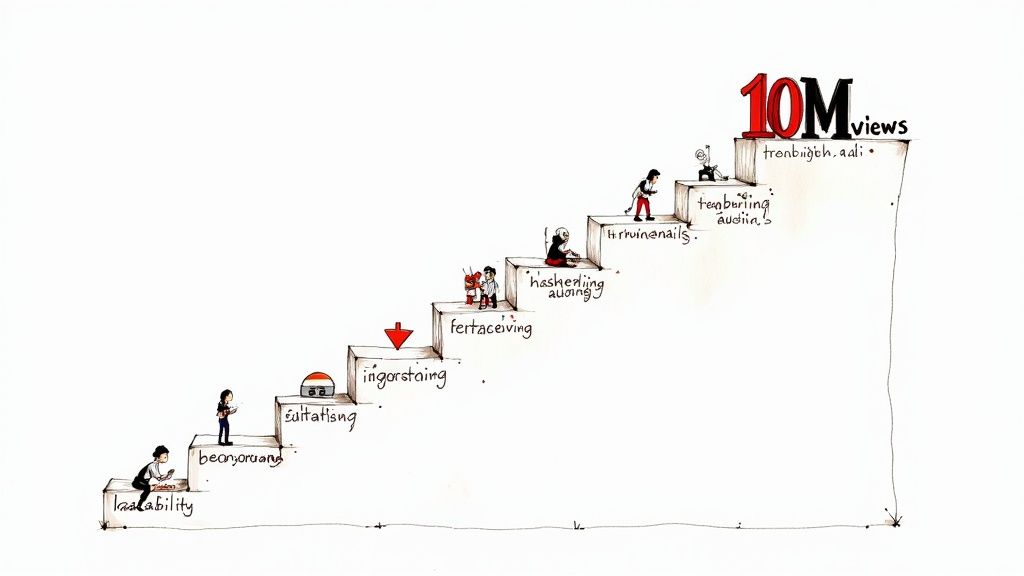
When you get rid of a messy bedroom or a boring wall behind you, you instantly create a more professional, studio-like feel that holds a viewer's attention. For more on this and other visual tricks, check out our full post on https://videobgremover.com/blog/youtube-shorts-best-practices.
A professional look isn't about expensive gear; it's about smart choices. A clean background, good lighting, and clear audio can make your content feel premium and significantly increase its shareability.
Create Binge-Worthy Loops and Series
The ultimate power move is to turn a single view into a full-on binge session. When you create content that flows logically from one Short to the next, you give people a reason to land on your channel and stick around.
A "content loop" is a video that ends in a way that makes you want to watch it again immediately, which can do wonders for your watch time. A series, on the other hand, is all about the hook—starting with a "Part 1" that leaves viewers hunting for "Part 2" on your channel page.
Here are a few ideas to get you started:
- Tell a Story in Parts: Break a compelling narrative into three or four Shorts, ending each one with a cliffhanger that leaves them wanting more.
- Try a "Theme Day": Post a handful of related Shorts on the same day. Think "5 Beginner Guitar Chords," released one after another.
- Use a Visual Cliffhanger: End your video with a quick, mysterious glimpse of something you promise to explain in the next one.
By mixing trend-hopping with sharp optimization and a focus on quality, you build a powerful growth engine. This deliberate approach will help you smash that 10 million view target much faster than just uploading randomly and hoping for the best.
Earning Beyond Ads with Your Shorts
Getting into the YouTube Partner Program (YPP) is a huge milestone, but thinking it's only about getting a cut of the Shorts ad money is a big mistake. It's like being handed the keys to a kingdom but only ever visiting the front gate. Once you're in the YPP, your Shorts stop being just videos and start being powerful magnets for your audience, pulling them toward much more profitable ways to support you.
If you only rely on the ad revenue share, you're leaving a ton of potential earnings behind. The real pro move is to see your Shorts as the very top of your business funnel—they grab the eyeballs, and then you guide that attention toward deeper, more direct support from your biggest fans.
Activating Fan Funding Features
As soon as you’re YPP-approved, a whole new world of fan funding tools unlocks, and they work brilliantly with Shorts. These features let your audience pay you directly, which often blows the ad revenue share out of the water.
The most straightforward feature is Super Thanks. This is basically a digital tip jar right on your Short. A viewer loves your video, they can send you a few bucks on the spot. Think about it: if one of your Shorts hits a million views, even a tiny percentage of those people sending a tip can add up to way more than you'd ever make from the ad pool on that same video.
But it goes way beyond one-off tips. Your Shorts are now your best promotional tool for building steady, recurring income.
- Channel Memberships: You can use a Short to give a sneak peek of some exclusive content or a behind-the-scenes moment that’s only for channel members. A quick, simple call-to-action at the end—"Want more? Join the club!"—can send a flood of new people to your membership page.
- YouTube Shopping: Got merch? Selling digital products? You can tag those products right in your Shorts. This turns your quick video into a mini-storefront where people can see something they like and buy it without ever leaving the app.
Think of each Short not just as a piece of content, but as an advertisement for your entire brand. Its primary job is to attract new eyes, but its secondary, more lucrative job is to convert those viewers into dedicated supporters.
Building a Sustainable Creator Business
These extra income sources are what turn a hobby into a real, stable business. Shorts ad revenue can be a rollercoaster, bouncing around based on things you can't control. But income from memberships and product sales? That's far more predictable. You can dive deeper into this strategy in our complete guide on how to monetize YouTube Shorts.
By diversifying how you make money, you're building a safety net for your channel, protecting it from algorithm whims and shifting ad rates. If you want to get even more creative, you can explore various community monetization models that build on this same idea of direct fan support.
To give you a clearer picture, here’s a quick look at how these YPP features plug directly into your Shorts strategy.
Additional Revenue Streams for Shorts Creators
A look at the other monetization features you unlock by joining the YPP and how to integrate them with your Shorts strategy.
| Monetization Feature | How It Works with Shorts | Potential Impact |
|---|---|---|
| Super Thanks | Viewers can purchase a fun animation on your Short to show support. | Creates an immediate, direct income stream from viral or helpful content. |
| Channel Memberships | Promote exclusive perks in your Shorts to drive sign-ups. | Builds a stable, recurring monthly income from your most loyal fans. |
| YouTube Shopping | Tag your own products or affiliate products directly in your Shorts. | Turns your content into a direct sales channel, earning you sales or commissions. |
At the end of the day, meeting the YouTube Shorts monetization requirements isn't the finish line; it's the starting pistol. True success comes from using the massive visibility your Shorts generate to build a multi-layered business where ad revenue is just one part of a much bigger, and much more profitable, picture.
Your Top Shorts Monetization Questions, Answered
As you start getting serious about turning your YouTube Shorts into a revenue stream, the details really begin to matter. It's natural to have questions as you navigate the process. Let's clear up some of the most common hurdles creators face on the path to getting paid.
Do I Need 10 Million Views AND 4,000 Watch Hours?
Nope, and this is a big one that trips people up all the time. The good news is you don't need both. Think of them as two different paths to the same destination: the YouTube Partner Program (YPP).
You just need to hit the subscriber milestone and then meet one of the viewership requirements. The full formula is 1,000 subscribers, plus one of the following:
- 10 million valid public Shorts views in the last 90 days.
- 4,000 public watch hours on your long-form videos in the last 12 months.
So, if you're all-in on Shorts, you can completely ignore the 4,000-hour mark. If you're a traditional vlogger dabbling in Shorts, the watch hours from your longer videos might get you there first. Pick a lane and go for it.
Why Does My Shorts Revenue Seem So Low Compared to My Regular Videos?
If you're looking at your Shorts revenue per view (RPM) and comparing it to what you earn from long-form content, it can be a bit of a shock. But it's crucial to understand they are fundamentally different systems. They aren't even in the same ballpark.
With Shorts, ads don't play before your specific video. Instead, they appear between Shorts in the feed. All the money generated from these ads goes into one giant "Creator Pool." From that pot, YouTube first pays for music licensing. The rest is then distributed among all eligible creators based on their percentage of total views. You get 45% of whatever portion you're allocated. Because you're getting a small slice of a massive pie instead of a dedicated ad, the per-view earnings will naturally be much lower.
Can I Still Make Money From Shorts if I Use Popular Music?
Absolutely! This is actually one of the best parts of the whole system. The Creator Pool model was built from the ground up to solve the massive headache of music licensing.
When YouTube calculates the Creator Pool, they first set aside money to pay the music industry. This means you can freely use tracks from the Shorts audio library to jump on trends without fearing a copyright claim will wipe out your earnings. Your 45% cut is calculated after all the music licensing costs have been handled for everyone. It's a clean and simple way to let you be creative without the legal stress.
What’s the Plan if My YPP Application Gets Rejected?
Getting rejected is a bummer, but it's not the end of the road. First, don't panic. YouTube will give you a reason, which is often a bit vague, like "reused content" or "repetitious content." Your job is to read between the lines and take that feedback to heart.
You'll have to wait 30 days before you can apply again. Use that time wisely. Go through your channel with a critical eye and compare your videos against YouTube's official monetization policies. Delete or heavily edit any videos that could be borderline. The goal is to prove you're adding unique value before you hit that re-apply button.
Ready to give your Shorts a polished, professional edge that helps them pop in the feed? A clean background is a game-changer. With VideoBGRemover, you can instantly get rid of distracting backgrounds without needing a green screen. It's the perfect way to create that studio look that can help you stand out and rack up more views. Give it a try for free today
Tagged with
Ready to Remove Your Video Background?
See a free preview before you buy.
No credit card required • Free preview on every video